Orcam Read 3

Orcam Read 3

HT407

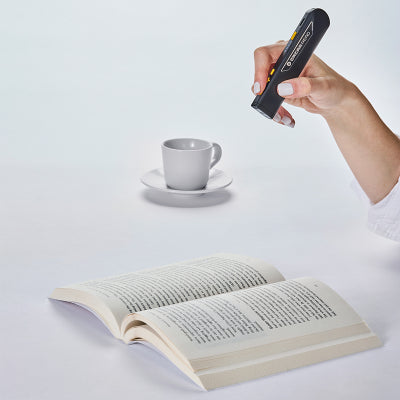
OrCam Read 3 is a versatile handheld device for people with vision loss or reading fatigue. It reads any printed or digital text aloud and magnifies text, images, handwriting, and math formulas on your screen.

Special order

We work with partners to deliver products on our behalf. We will pass on your contact information to be able to deliver the product effectively. While delivery is usually a few days, it can take up to seven working days.
Price £2,268.00
Sale price £2,268.00 Was £0.00
In Stock
Price £1,890.00 ex VAT
Sale price £1,890.00 ex VAT

Product eligible for VAT exemption.

Are you exempt from paying VAT?

If you are blind or partially sighted, you do not have to pay VAT on specially designed products. To check if you are eligible for VAT exemption — please see our Prices and VAT FAQs.

Price: £2,268.00 inc VAT In Stock

OrCam Read 3 is an all-in-one solution for people with vision loss or reading fatigue. With this handheld device, you can easily read any printed or digital document aloud, or you can magnify text, pictures, handwriting, and mathematic formulas on your computer screen.

The Smart Magnifier uses AI assistance to retrieve information, summarise the text, and answer related questions about the text.

OrCam Read 3 is supplied with a reading stand, so you don't have to hold the device while reading for long periods.

OrCam Read 3 can easily read printed or digital text from any surface. With the Smart Reading feature you can quickly locate and jump to specific words or sections of interest in the text. These features work without a wi-fi connection, so can be used both at home or on-the-go.

It can also read handwriting from shopping lists, address books, birthday cards and more when connected to wi-fi (and the text is in English).

When used as a magnifier, OrCam Read 3 allows you to zoom in on captured images, read captured text aloud, and explore various options, including changing contrast.

The OrCam Read 3's Summarisation feature uses AI technology to provide a concise summary of scanned text, from a few sentences to an entire page. This feature requires a wi-fi connection, and for the text to be in English.

Control the device with your voice, intuitive hand gestures, or the capture button.

For more details about this product, check the product instructions manual (in the User Guides tab) to help you decide if this product is suitable for you.

RNIB Technology Support  

For information or advice on technology that will be suitable for your needs, please contact our team on 0303 123 9999 and speak to one of our advisors within the Sight Loss Advice Service.

Special order 

We work with partners to deliver products on our behalf. If you’re buying a special order product, we will pass on your contact information to our partners to enable delivery. We may also quote extended delivery times, outside of our standard terms and conditions for these products.

Important – order cancellations and returns

We are unable to cancel your order once it has been placed. Should you change your mind about this special order product, you will need to accept the delivery and then contact RNIB Helpline to arrange its return; guidance on how to do this can be found in our Returns Policy.

This product is returnable within 14 days of receipt in an “as new” condition in original, undamaged packaging. We kindly ask our customers to ensure that any faulty products being returned are packaged securely for stable transit, or the warranty may be voided. Where possible, please use the original packaging.

This item is eligible for VAT exemption.

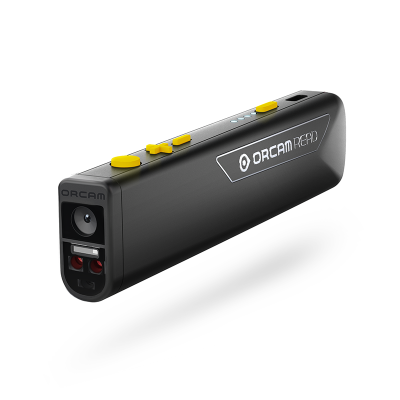
  • Lightweight smart camera for reading text and magnifying text and images.
  • Able to read font size 4pt and up.
  • Bank note detection.
  • Barcode recogniser.
  • Clear, synthetic English voice – switch easily between male and female.
  • Easy-to-use with large, high-contrast, tactile buttons.
  • Colour: Black with yellow buttons.
  • Does not require an internet connection when reading printed or digital text.
  • Listen via device’s mini speakers, wired headphones or Bluetooth headphones or speaker.
  • Built-in LED light for reading in dimly lit environments.
  • Integrated 3.5mm headphone jack.
  • Recycling information: Packaging is fully recyclable.

Dimensions

  • Size: 122 × 25 × 13mm
  • Weight (OrCam Read 3 only): 50g

Battery and charging

  • Built-in rechargeable battery (700 mAh, 3.8VDC) with two-hour battery life and LED battery indicator.
  • USB-C charging port.
  • USB-C cable and power adapter supplied.

In the box

  • OrCam Read 3.
  • OrCam Read stand.
  • OrCam speaker.
  • Case.
  • Wired earphones.
  • Cleaning cloth.
  • Instructions.

Warranty

  • 1-year warranty.

Special order

We work with partners to deliver products on our behalf. If you’re buying a special order product, we will pass on your contact information to our partners to enable delivery. We may also quote extended delivery times, outside of our standard terms and conditions for these products.

Important – order cancellations and returns

We are unable to cancel your order once it has been placed should you change your mind.

Help and guidance

Frequently asked questions

Common questions about this product. If you need more help, our team is happy to talk it through with you.

  • My player will not turn on or looks like it is not charging 

    If you hear the battery low announcement twice, then you must charge the unit after the second voice prompt is heard. If the battery level drops below 3.3 volts, then the speaker will be muted until it is charged. Once the charger is connected the time will vary for the battery level to return to 3.3 volts or higher, and during this time the player may appear that it is not charging. 

    Please follow these steps: 

    1. Plug the USB-C charging cable into the player. 
    2. Leave it on charge for at least 15 minutes. 
    3. Keep the charger plugged in, and press the power button to turn the player on. 

    If the battery was completely drained, the player may need to be left on charge for up to 30 minutes before it turns on. 

    If the player does not turn on after charging for one hour try the following: 

    • Check the charger cable is firmly plugged in. 
    • Try a different wall socket. 
    • Make sure the power is switched on at the socket. 
    • Try a different USB-C charging cable. 
  • My USB memory stick is not playing any books 

    If your USB memory stick is not working, it may need to be reformatted. This will remove everything from the stick. 

    Important: Before you start, save your books on your computer. 

    How to reformat a USB memory stick on a Windows PC:

    1. Put the USB stick into your computer. 
    2.  Open File Explorer. 
    3. Locate the USB stick from the list of drives and copy all files and place them on your computer in another location. 
    4. Move back to the USB drive in Explorer, then bring up the context menu options for the USB drive and choose Format. 
    5. Choose FAT32 (or exFAT if FAT32 is not shown). 
    6. Select Start and wait for it to finish. 
    7. Copy your files back on to your stick. 
    8. Remove the USB stick safely. 

    How to reformat a USB memory stick on a Mac:

    1. Insert the USB stick into your Mac. 
    2. Open Disk Utility. 
    3. Select the USB stick from the list of available options and copy the files from the stick to another location on your Mac. 
    4. Move back to your USB stick and choose Erase. 
    5. Set the format to MS-DOS (FAT). 
    6. Select Erase and wait for it to finish. 
    7. Add your books back on to your USB stick. 
    8. Remove the USB stick safely. 
    9. Checking your reformatted stick is working 

    Once your books are copied back on to the USB stick from your computer, insert the stick back into the RNIB Accord player. Turn the player on and check it plays as expected. 
Recently Viewed